
The best background for headshots is not always the most dramatic one. It is the background that supports your face, fits your profession, and works wherever the image appears, from LinkedIn to a company bio. A strong headshot background should make you look clear, credible, and easy to recognize without pulling attention away from you.
That is why background choice matters for professional headshots, business headshots, AI headshots, and traditional studio portraits alike. There are clean studio options, softly blurred environments, office settings, outdoor looks, and simple white backgrounds. The right choice depends on your role, industry, personal brand, and how formal the final image needs to feel.
What Is the Best Background for Headshots?

What is the best background for headshots? For most professionals, the best choice is a clean, simple background with low visual distraction and enough contrast to separate the person from the scene. White, light grey, soft neutral tones, blurred office backgrounds, and subtle environmental settings all work well when they keep the focus on the face.
A background should also match the platform. A LinkedIn headshot usually benefits from a polished, professional look. A speaker bio may allow more personality. A real estate agent, consultant, founder, or creative professional might use an office, city, or natural environment to add context. The rule is simple: if the background helps people understand who you are without competing with your expression, it is doing its job.
Headshot With White Background
A headshot with white background is one of the safest and most versatile options. It feels clean, modern, and easy to use across resumes, company directories, conference pages, email profiles, and business websites. White also works well when a team needs consistency, because every person can appear in the same visual style even if their photos were created at different times.
The main challenge with white is avoiding a flat or washed-out look. Clothing should create contrast, and the lighting should shape the face instead of making everything look equally bright. Navy, charcoal, forest green, burgundy, black, and textured neutrals often photograph well against white. If your hair, shirt, and background are all very light, the portrait can lose definition. A good white-background headshot should feel crisp, not clinical.
Blurred Background
A blurred background gives a headshot depth while keeping attention on the person. It is often used for LinkedIn headshots, executive portraits, personal branding photos, and website bios because it feels natural without becoming visually busy. A blurred office, city street, window, library, or greenery scene can add warmth and context while still looking professional.
The key is restraint. The background should be soft enough that objects, people, signs, and bright colors do not distract from your face. If the blur is too weak, the scene can feel cluttered. If it is too artificial, the image may look over-edited. A tasteful blurred background should create separation, support the mood, and make the headshot feel more dimensional.
The Environmental Background: When Context Helps Your Headshot

An environmental background shows a little of the world around you. This can be powerful when your work is connected to a specific setting, such as an office, studio, clinic, co-working space, workshop, outdoor location, or city backdrop. Unlike a plain studio background, an environmental portrait gives viewers a quick signal about your personality, pace, or professional environment.
This approach works especially well for entrepreneurs, consultants, coaches, real estate professionals, creatives, academics, speakers, and small business owners. A founder may look more approachable in a bright workspace. A designer may benefit from a tasteful studio or textured wall. A therapist or wellness professional may choose soft natural light and calming colors. An actor or performer might need a background that feels authentic but not distracting.
The risk is visual noise. Environmental headshots can go wrong when the location becomes the subject. Busy shelves, harsh sunlight, strong patterns, visible text, signage, or clutter can weaken the image. A better approach is to use the environment as a subtle frame: soft background detail, clean lines, flattering light, and a color palette that complements your outfit.
This is where AI professional photos can be useful. With a tool such as QuickAI Headshots, you can explore professional-looking background styles without booking multiple locations or coordinating a traditional photoshoot. QuickAIHeadshots.com is convenient for people who need options for LinkedIn, resumes, websites, business profiles, and personal branding, while still wanting the final headshot to look realistic and aligned with their role.
How to Choose a Background That Matches Your Personal Brand
Start by asking what you want the headshot to communicate. If your brand is formal, precise, and corporate, choose white, grey, navy, or a refined office background. If your brand is warm and approachable, try soft neutral tones, window light, or a lightly blurred indoor setting. If your work is creative or public-facing, a subtle environmental background can add personality.
Color harmony matters. Your background should not clash with your clothing or skin tone. For a professional profile picture, avoid highly saturated colors unless they are intentional and balanced. Also consider the crop. A background that looks good in a wide portrait may become awkward when cropped into a small circle on LinkedIn or an email account.
Practical Checklist for Better Headshot Backgrounds
Use this quick checklist before choosing or generating your next business headshot. It applies whether you are using a photographer, a headshot generator, or AI headshots from QuickAI Headshots.
- Keep the focus on your face: avoid clutter, strong patterns, and background objects that compete for attention.
- Match your industry: finance, law, and corporate roles often suit clean studio looks, while creative and client-facing roles may allow more context.
- Check contrast: your hair, shoulders, and outfit should separate clearly from the background.
- Think about platform use: LinkedIn, resumes, company bios, portfolio pages, and social profiles may need slightly different levels of formality.
- Choose flattering light: soft, even light usually looks more professional than harsh shadows or mixed indoor lighting.
- Avoid over-editing: the background should feel realistic, not pasted on or overly smooth.
Common Background Mistakes to Avoid
The most common mistake is choosing a background because it looks interesting instead of because it supports the portrait. A dramatic wall, colorful mural, or busy office may seem memorable, but it can make a headshot harder to read at small sizes. Distracting backgrounds also make it difficult to use the same image across professional platforms.
Another mistake is ignoring the outfit. A black jacket against a dark background can make the shoulders disappear. A white shirt against a white background can look unfinished. Casual selfies often include kitchens, cars, bedrooms, or crowded public spaces, which may not send the right message for a professional headshot. A polished background helps your expression, posture, and clothing do the work.
Using Your Headshot Across LinkedIn, Resumes, and Websites
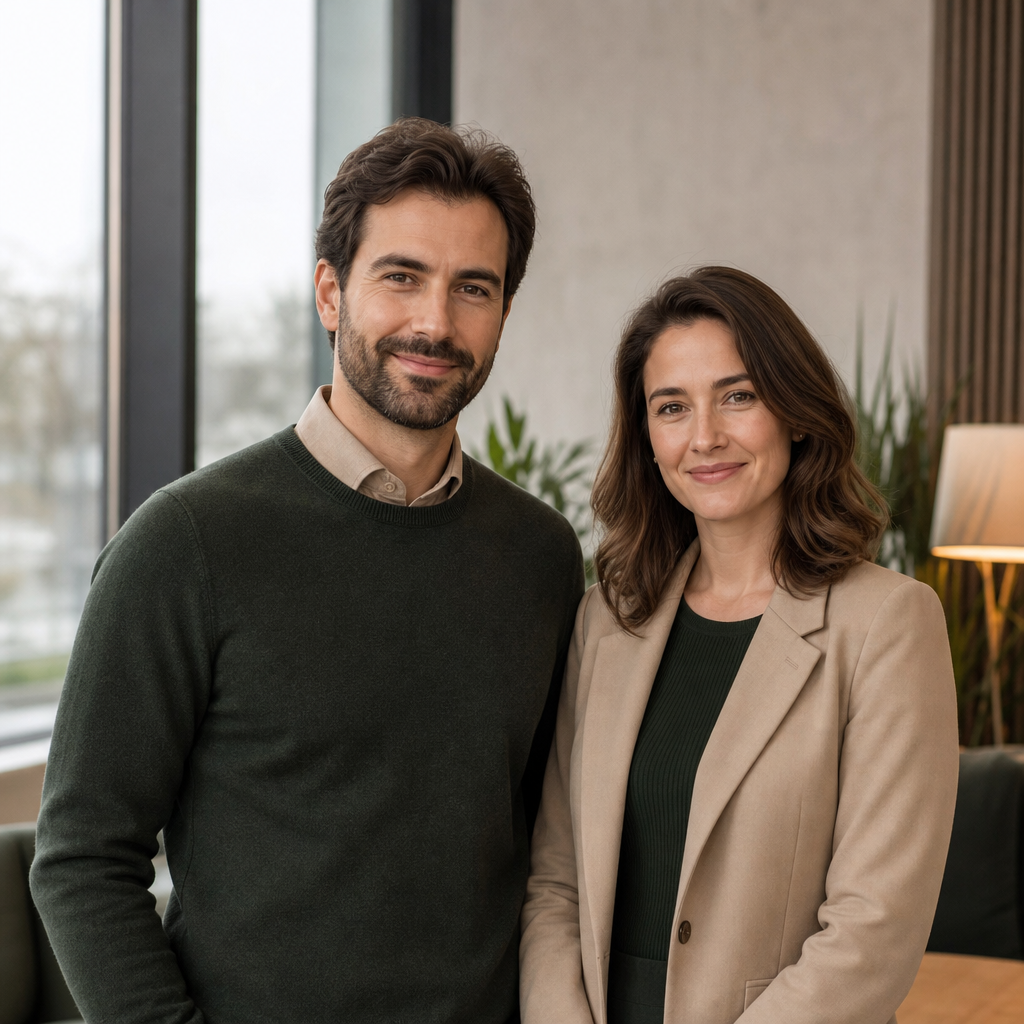
A good headshot background should remain effective in multiple formats. On LinkedIn, the image may appear as a small circle, so simple backgrounds are usually best. On a resume or personal website, a little more context can work if the design is clean. For company pages, consistency across a team often matters more than individual creativity.
QuickAI Headshots can help you create variations for different uses, such as a formal corporate headshot, a friendly LinkedIn headshot, or a polished personal branding photo. The goal is not to look like a different person on every platform. It is to look consistently professional while adjusting the background and tone to fit the setting.
Try QuickAI Headshots for Professional Background Options
If you want professional headshots without scheduling a studio session, QuickAI Headshots offers a practical way to create polished options for online use. You can explore clean white backgrounds, neutral studio looks, business-friendly settings, and more personal branding styles depending on what fits your goals.
QuickAIHeadshots.com is especially useful if you need a refreshed online profile photo for LinkedIn, a resume, a website bio, a business profile, or a team page. It is not about replacing every photographer in every situation. It is about giving busy professionals a fast, convenient alternative when they need credible, professional-looking headshots with backgrounds that suit their brand.
Conclusion: Choosing the Best Background for Headshots
The best background for headshots is the one that makes you look clear, confident, and appropriate for the places your photo will appear. White is versatile, blurred backgrounds add depth, and environmental settings can communicate personality when used carefully. Keep the focus on your face, choose colors that support your outfit, and match the image to your professional goals.
Whether you need AI headshots, corporate headshots, or a refreshed professional profile picture, QuickAI Headshots can help you create polished options without the friction of a traditional photoshoot. A thoughtful background will not do the work for you, but it can help your first impression feel more intentional and professional.